Run IT Solutions Limited
  • 0 Shopping Cart
  • Home
  • Store
    • Browse All
    • Linux Cloud Web Hosting
    • Windows Cloud Web Hosting
    • Business Email
    • Dedicated Server
    • SSL Certificates
    • Register a New Domain
    • Transfer Domains to Us
  • Announcements
  • Knowledgebase
  • Network Status
  • Affiliates
  • Contact Us
  • More
  • Account
    • Login
    • Register
    • Forgot Password?
  1. Portal Home
  2. Knowledgebase
  3. Webhosting
  4. How to preview a website

  Categories

Dedicated Server
1
Domain
3
Email Hosting
67
VPS Hosting
0
Webhosting
20

  Categories

  Support

My Support Tickets
Announcements
Knowledgebase
Downloads
Network Status
Open Ticket

How to preview a website Print

  • 0

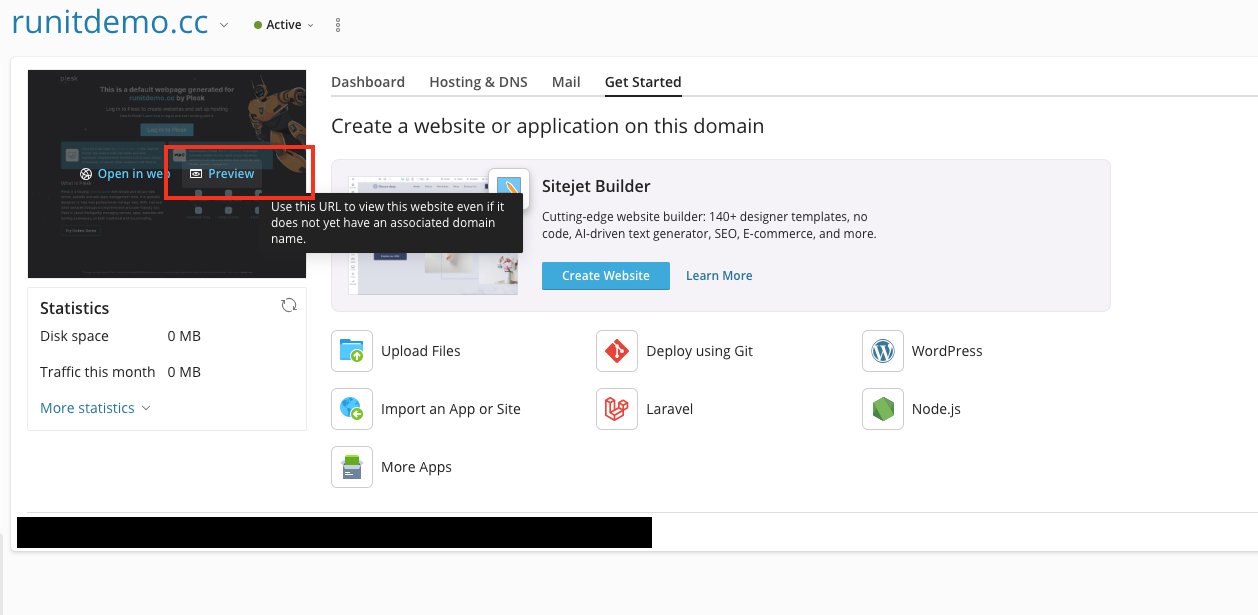
To preview a website:

  1. Go to Websites & Domains.
  2. Click Preview under the name of the website you want to preview.

Your website will open in a new browser tab. You can share the preview link with other people - it works anywhere in the world.

Was this answer helpful?

Related Articles

Adding and Remove FTP Accounts To create an additional FTP account: Log in to Plesk. Go to Websites & Domains,... Changing FTP Access Credentials To change FTP account username or password of your system user: Go to Websites... Create a Website Create a Website This approach is best if one or more of the following are true: You plan to... Create a Website Using a CMS This approach is best if one or more of the following are true: You prefer to focus on... Creating Databases Watch the video tutorial You can create and remove databases in Websites &...
« Back

  Support

My Support Tickets
Announcements
Knowledgebase
Downloads
Network Status
Open Ticket
  • Contact Us
  • Terms of Service

Copyright © 2026 Run IT Solutions Limited. All Rights Reserved.


Loading...
Loading...
Choose language
中文
中文
English

Choose Currency

$ HKD
$ SGD

Generate Password

Please enter a number between 8 and 64 for the password length